


For those who have set up an POP email account and integrated it with Outlook 2003. If your emails are being completely deleted after you have opened them, you need to go to ‘Tools’ > ‘E-mail Accounts’ > ‘Next’ > Highlight the problem account and click on ‘Change’ > ‘More Settings’ > ‘Advanced’.
Here you need to check ‘Leave a copy of messages on the server’ and maybe ‘Remove from the server when deleted from ‘Deleted Items”.
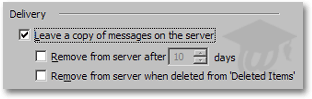
An image of the ‘Delivery’ section in Outlook 2003, courtesy of www.freeemailtutorials.com
I hope this helps others with the same issue – and saves a bit of time…